AI Product Recommendations learns which products your shoppers view and buy together, then recommends them on your product pages, in the cart and on landing pages. It only reads your store — it never changes your catalogue.
In this tutorial we’ll install it, connect it to your store and build the first model, so recommendations are ready before you add the widgets.
Steps in short
- Install AI Product Recommendations and approve its read-only permissions.
- Open AI Recommendations from the sidebar to connect your store.
- Press Rebuild model instead of waiting for the first scheduled run.
- Reopen the page and check the badge says Up to date.
- Put the widgets on your product, cart and home pages.
1. Install it from the Orbit plugin store
Find AI Product Recommendations in the Orbit plugin store and install it. It costs £39.99 a month after a 7-day free trial.
On the install screen, under “This plugin will have access to:”, you’ll see View all products, View product details, View customer details, View all orders, View order details and View store settings. Every one of them is read-only.
2. Open it once to connect your store
Open AI Recommendations from your dashboard sidebar, under Installed Plugins. The first visit connects the plugin to your store — until then it can’t sync or receive anything from your store, so do it straight after installing.
If the Model status badge says Not connected yet on that very first visit, refresh the page.
3. Build the first model now
Press Rebuild model at the top right. It syncs your catalogue and builds the model in the background, and you’ll see “Model rebuild started — check back in a minute”. Without it, the first build waits for the next scheduled run, which happens every six hours.
The first model links products that share tags or categories and are close in price — the Similar matches. Bought-together and viewed-together links follow as shoppers browse and buy.
4. Check the model status
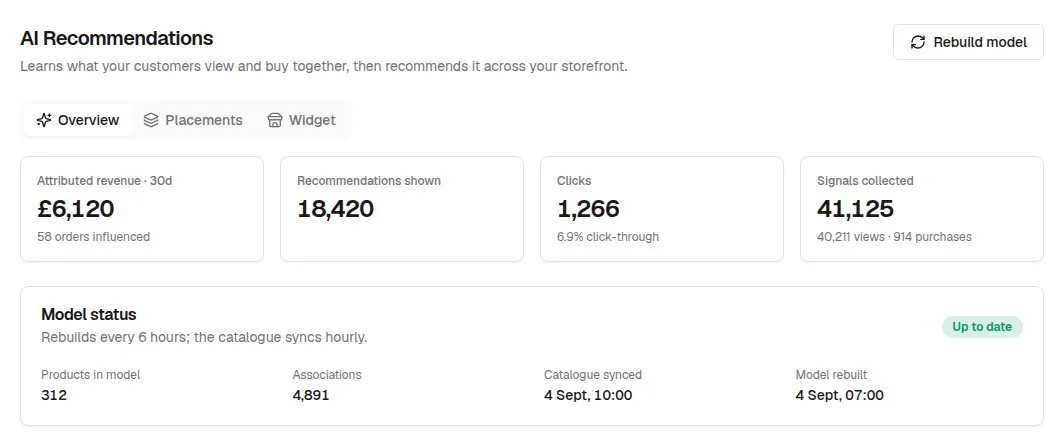
Come back after a minute. On the Overview tab, the Model status card shows Up to date, how many products are in the model, how many associations it found, and when the catalogue was last synced and the model last rebuilt.
5. Add the widgets to your storefront
Recommendations appear wherever you place the widgets. Start with your product pages — that’s also where the plugin learns what shoppers view:
Good to know
- On a brand-new store, the Trending now and cart widgets stay empty until shoppers have viewed or bought something, because trending is worked out from real activity. Product-page recommendations start with Similar products straight away.
- Good tags and categories make better early recommendations: products with none can’t be matched as Similar.
- Learning starts from the day you install — past orders aren’t imported.
AI Product Recommendations£39.99 a month · 7-day free trial · billed through Orbit