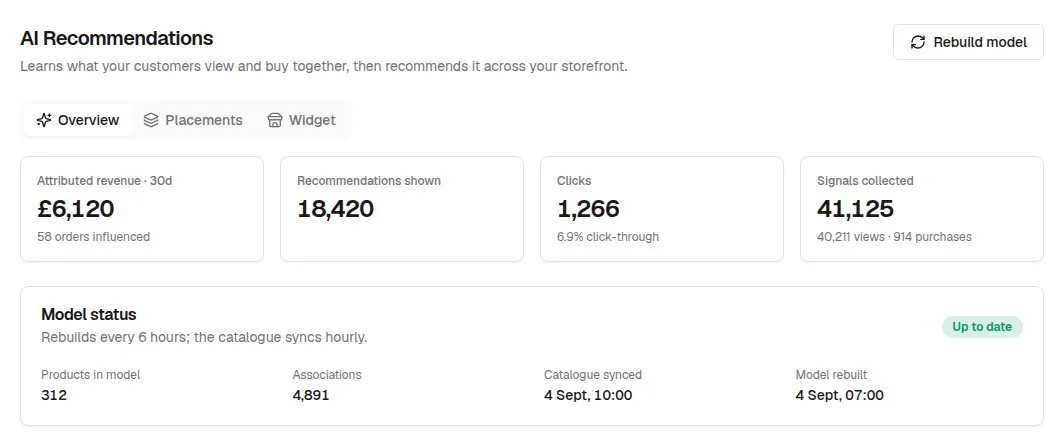
The Overview tab shows how your recommendations performed over the last 30 days. In this tutorial we’ll explain each figure — including exactly how revenue is credited — and the other places the plugin reports in your dashboard.
In short
- Understand how Attributed revenue · 30d is credited.
- Read Recommendations shown, Clicks and click-through.
- Signals collected is views plus purchases the model learns from.
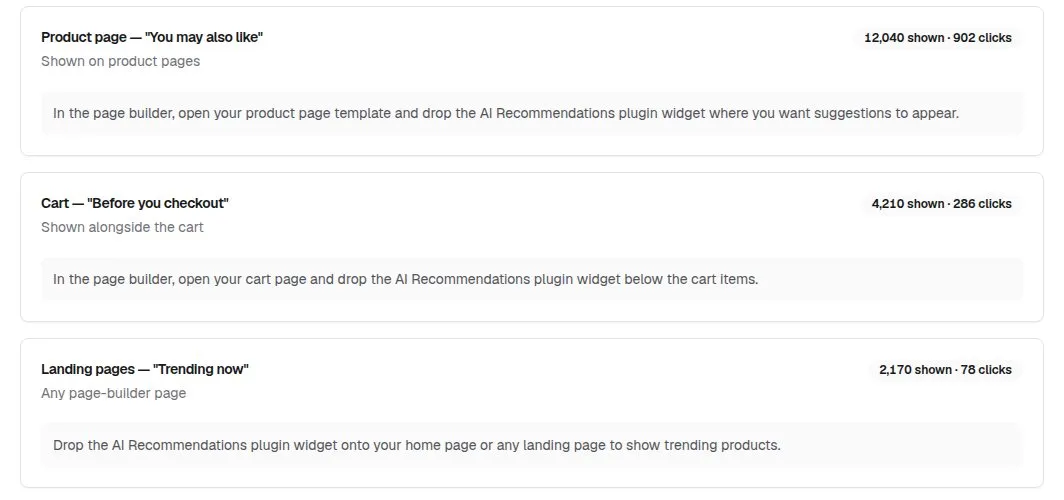
- Use the Placements tab for per-placement figures.
- Find the Recommendations Performance card and the product editor block.
1. Attributed revenue
When an order comes in, each line is checked for a click on that same product in a recommendation widget within the previous 7 days. If there is one, that line’s total is credited and the order counts as influenced. The figure is the total of the credited lines, not whole orders.
Read it as a guide, not an exact figure. Widgets can’t see who is shopping, so a click is matched to the next order for that product rather than to the shopper who clicked. Refunds aren’t deducted, and the figure is shown in pounds.
2. Recommendations shown and clicks
Recommendations shown counts product cards displayed — a four-product widget on one page view counts four. Clicks counts card clicks, and the click-through rate is clicks divided by cards shown. Previews in your dashboard are never counted.
3. Signals collected
Signals collected is the number of product views and purchases recorded in the last 30 days — the raw material the model learns from. Purchases are counted per order line.
4. See each placement’s numbers
The Placements tab splits cards shown and clicks between the product page, cart and landing page placements.
5. Check the dashboard home and product editor
Your dashboard home has a Recommendations Performance card with attributed revenue, recommendations shown, clicks and click-through. And when you edit a product, an AI Recommendations block under Plugins lists up to six products the model links to it — labelled Bought together, Viewed together or Similar product, with a strength bar.
Good to know
- All figures cover the last 30 days; there’s no date picker.
- The product editor block always ranks with the Balanced weighting, so it can differ slightly from what shoppers see.
AI Product Recommendations£39.99 a month · 7-day free trial · billed through Orbit