Once your bundles are selling, the bundle list is where you look after them. This tutorial covers statuses, editing, pausing, syncing and deleting.
Steps in short
- Check each bundle’s status and sync badge.
- Edit it, then press Save & sync to publish the change.
- Use Pause; Activate puts it back.
- Use Sync to catalog after item changes or a sync error.
- Delete archives the product and keeps sales history.
1. Read the bundle list
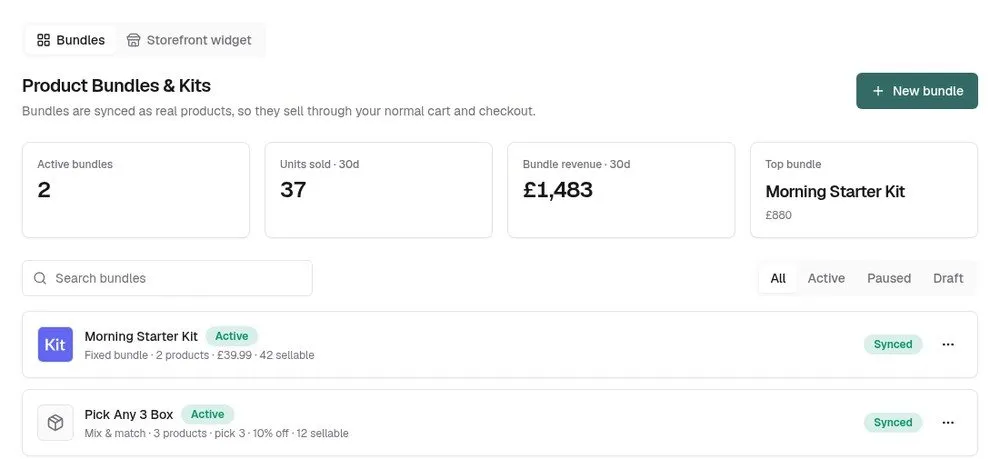
The Bundles tab shows active bundles, units sold and bundle revenue over the last 30 days, and your top bundle. Each row has a status — Active, Paused or Draft — and a sync badge: Synced, Pending (changes not on your store yet) or Sync error, with the reason underneath.
2. Edit a bundle
Click a bundle, or choose Edit from its ⋯ menu, change what you need and press Save & sync. On a bundle that’s already live, Save draft keeps your changes unpublished — the old version keeps selling and the badge shows Pending until you sync.
3. Take a bundle off sale
Choose Pause to hide the bundle product from your store without deleting anything. Activate puts it back on sale. Check the sync badge afterwards — a Sync error means the change didn’t reach your store.
4. Sync a bundle
Sync to catalog refreshes the bundle product from its items — names, prices and stock. Use it after restocking items, or to retry after a sync error once you’ve fixed the cause.
5. Delete a bundle
Delete archives the bundle’s catalogue product and stops it selling. Sales history is kept, but it can’t be undone.
Good to know
- If an item inside a bundle is deleted from your catalogue, the bundle is paused automatically with the message “A component product was deleted from the catalog — review this bundle”.
- Uninstalling the plugin leaves bundle products in your catalogue — still for sale, but no longer taking stock off their items. Pause or delete bundles first.
Product Bundles & Kits£19.99 a month · 7-day free trial · billed through Orbit